onbon bx06 api for Android

This document describes how to create a project of onbon.bx06 api in Android Studio IDE.
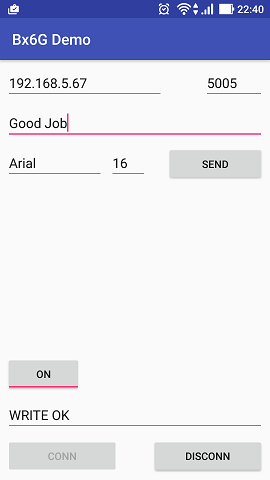
Test target of github source is BX-6Q2. Test information always be showed at fixed position (96,0) with fixed size (32,32).
dependency files
JAR - onbon bx06 api Java Libraries (7/10)
-
bx06.message-x.x.x-SNAPSHOT.jar
-
bx06-x.x.x-SNAPSHOT.jar
-
log4j-1.2.14.jar
-
simple-xml-2.7.1.jar
-
uia.comm-x.x.x.jar
-
uia.message-x.x.x.jar
-
uia.utils-x.x.x.jar
AAR - onbon bx06 api on Android devcie Libraries (Android only)
- java.awt4a-0.1-release.aar
project configuration
build.gradle
- flatDir - setup where library files saved.
allprojects {
    repositories {
        jcenter()
        flatDir {
            dirs 'libs'
        }
    }
}
app configuration
build.gradle
-
project.ext.set - output name.
-
dexOptions - allow to load Java AWT for Android。
-
dependencies - define dependency files of onbon.bx06 API including JAR and AAR. All files saved in libs folder. Note: file names need to be changed to correct version.
android {
    ...
    defaultConfig {
        ...
        project.ext.set("archivesBaseName", "bx6g.mobiledemo-" + defaultConfig.versionName);
    }
    dexOptions {
        preDexLibraries = false
        additionalParameters =["--core-library"]
    }

}

dependencies {
    ...
    compile files('libs/bx06.message-0.5.0-SNAPSHOT.jar')
    compile files('libs/bx06-0.5.0-SNAPSHOT.jar')
    compile files('libs/log4j-1.2.14.jar')
    compile files('libs/simple-xml-2.7.1.jar')
    compile files('libs/uia.comm-0.2.1.jar')
    compile files('libs/uia.message-0.5.1.jar')
    compile files('libs/uia.utils-0.1.2.jar')
    compile(name:'java.awt4a-0.1-release', ext:'aar')
    ...
}
AndroidManifest.xml
-
android:name - setup startup class to initial runtime environment of BX6G API.
-
android.permission.INTERNET - allow to use socket.
<application
    android:name="onbon.bx06.mobiledemo.MainApplication"
    ...>
</application>
<uses-permission android:name="android.permission.INTERNET" />
MainApplication.java
Implementation of class which defines at android:name in AndroidManifest.xml.
package onbon.bx06.mobiledemo;

import android.app.Application;

import j2a.awt.AwtEnv;
import onbon.bx06.Bx6GEnv;

public class MainApplication extends Application {

    private boolean initial;

    @Override
    public void onCreate() {
        super.onCreate();

        try {
            // java.awt for android initial
            AwtEnv.link(this);                          // link application and AWT
            AwtEnv.configPaintAntiAliasFlag(true);      // setup anti-alias flag.

            // BX6G API initial
            Bx6GEnv.initial();

            this.initial = true;
        }
        catch (Exception ex) {
            this.initial = false;
        }
    }
}
Develop
Screen operation
Because socket client can’t be run on UI thread, all operations execute to the screen need to be run in a new thread.
new Thread(new Runnable() {
    public void run() {
        // operate to screen
    }
}).start();
UI Update
After executing to the screen on non UI thread, use runOnUiThread to callback to UI thread.
runOnUiThread(new Runnable() {
    public void run() {
        // update UI
    }
});